Final invoice
Create a Final Invoice for new Work through Quick Add, or bill completed existing Work from its record.
Contractor invoice software
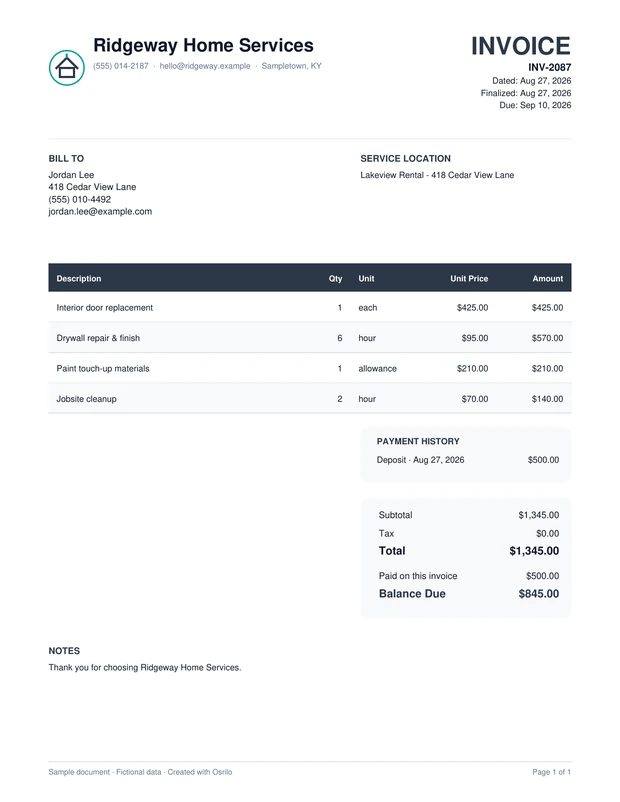
After the job, your Invoice should still know who the customer is, where the work happened and what was agreed. Osrilo keeps the document, balance and payment record connected to the Work.
Choose the billing path that reflects the work instead of making every bill behave like a final payment.
Create a Final Invoice for new Work through Quick Add, or bill completed existing Work from its record.
Use existing Work for Deposit or Progress Invoices. Issuing either one does not mark the Work complete.
Send or share the PDF, record received payments, and see the remaining balance and status on the connected Invoice.
Give the customer a clear account of the work and amount due without starting the paperwork over at the end of the job.
Include your business name and contact details. Eligible plans can add your logo and document color; set a prefix for new Invoice numbers so your documents stay organized.
Review the customer, location, descriptions and totals. Adjust the Invoice message and due date for the job, or use your saved defaults when they fit.
Save individual materials in the Price Book and pull them into the next Invoice in seconds. Add custom service or fee lines when needed, then review the final amount before sending.
Full logo and color branding is available on eligible plans. Free documents show Osrilo branding alongside your required business details.
Each step keeps the customer and Work context available for the next decision.
A customer approves a larger project. After creating the Work, issue a Deposit Invoice without completing the job. Later record actual field completion and create the appropriate final bill. Keep each payment and outstanding balance connected to its Invoice.
What Osrilo does not assume: Customer card or ACH payment options require an eligible paid plan and a connected, approved provider account. Provider fees are separate. Osrilo does not mark a Deposit or Progress Invoice as completed Work.
See the part of Osrilo that fits your next job.
The first eligible owned workspace starts with a 14-day Solo trial. No card required.