Start with context
Create an Estimate from a new request or related Work. Keep the customer, service property and scope together.
Contractor estimate software
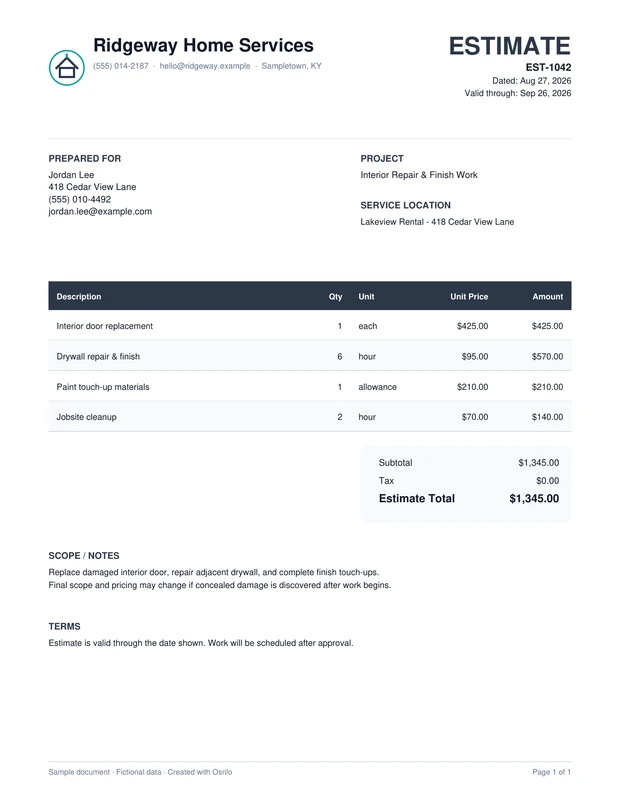
A useful Estimate reflects the customer, property, line items and actual work you discussed. Build it in an Osrilo workspace, reuse your Price Book where it fits, and keep the decision tied to the Work.
Osrilo is a connected Estimate workflow inside an account, not a stand-alone anonymous form.
Create an Estimate from a new request or related Work. Keep the customer, service property and scope together.
Add custom lines or reuse editable Price Book Services, Materials and Bundles. Review quantities, amounts, terms and the PDF.
Deliver the Estimate through an available method, record acceptance or rejection, and move approved Work toward scheduling.
Give customers a clear document without rebuilding the layout or typing your standard details for every quote.
Show your business name and contact information. With an eligible plan, add your logo and choose a document color that fits your brand.
Describe the work, materials, exclusions and allowances in customer notes. Set a valid-through date and tailor the terms for this job, with optional defaults ready for the next one.
Save individual services and materials in your Price Book. Add them to a new Estimate in seconds, adjust the quantity or price, and add custom lines as needed.
Full logo and color branding is available on eligible plans. Free documents show Osrilo branding alongside your required business details.
Each step keeps the customer and Work context available for the next decision.
A customer asks for a door and drywall repair. Add the two parts of the scope as separate editable lines. Review the total and send the Estimate. When it is accepted, the linked Work can enter the Scheduling Queue without recreating the customer and address.
What Osrilo does not assume: You set the prices and scope. Osrilo does not know your local labor costs, write a legal contract for you, or treat a viewed document as customer acceptance.
See the part of Osrilo that fits your next job.
The first eligible owned workspace starts with a 14-day Solo trial. No card required.